Last updated October 19, 2026
Bounding box vs segmentation, how to choose the right label type
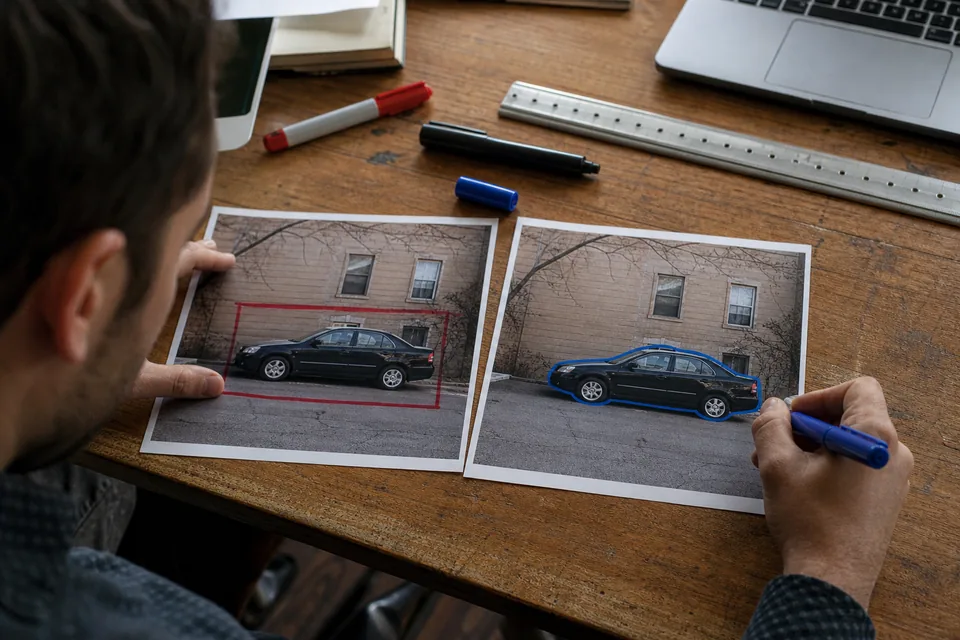
The bounding box vs segmentation decision sets the cost of your labeling project and the ceiling of what your model can do. Boxes are fast to draw and good enough for most detection tasks. Segmentation masks and polygons trace the exact shape of each object, which you need for measuring area, separating touching objects or cutting objects out of a scene, but they take longer and need tighter review. This guide explains what each label type captures, where each one wins, the hybrid approaches that save time, and the guidelines that keep both consistent.
What a bounding box captures
A bounding box is the smallest axis aligned rectangle that contains the visible part of an object. It stores four numbers and a class. A box tells the model where an object is and roughly how big it is. It does not say which pixels inside the rectangle belong to the object and which belong to the background.
For compact, roughly rectangular objects such as boxes on a pallet, cars seen from the side or faces, the background inside the box is small and the label is a good description of the object. For long, thin or diagonal objects such as a pipe, a crack or a person lying down, most of the box can be background.
What segmentation captures
Segmentation labels pixels. There are three common flavors.
- Semantic segmentation assigns a class to every pixel in the image, without separating individual objects. All road pixels are "road".
- Instance segmentation outlines each object separately, so two touching apples are two masks.
- Panoptic segmentation combines both: countable objects get instance masks, background regions like sky or floor get class masks.
Polygons and masks are two ways to store segmentation. A polygon is a list of points along the outline, light to store and easy to edit. A mask is a pixel map, better for holes, hair, foliage and fuzzy edges. Most tools convert between the two, with some loss on very complex shapes.
Bounding box vs segmentation side by side
| Factor | Bounding box | Polygon or mask segmentation |
|---|---|---|
| Labeling effort per object | Low, two clicks or a drag | Higher, many points or brush strokes |
| Review effort | Quick visual check | Edge by edge inspection |
| What the model learns | Location and extent | Exact shape and pixel membership |
| Touching or overlapping objects | Boxes overlap, hard to separate | Clean separation per instance |
| Thin or diagonal objects | Lots of background inside the box | Tight fit to the object |
| Area or size measurement | Rough | Precise |
| Common formats | COCO, YOLO, Pascal VOC, CSV | COCO polygons or RLE, YOLO segmentation variant |
| Typical tasks | Detection, counting, tracking inputs | Defect area, medical research, robotics grasping, background removal |
The rule of thumb: if your downstream logic only needs to know that an object is present and roughly where, use boxes. If it needs to know the exact shape, size or boundary, use segmentation.
When bounding boxes are the right choice
Boxes are the default for object detection, and for good reason.
- Counting items on a shelf, vehicles in a lot or people in a zone.
- Triggering an alert when an object appears, such as a missing helmet or a person in a restricted area.
- Feeding a tracker that follows objects across frames.
- Early prototypes, where you need a baseline fast and are not yet sure which classes matter.
- Large datasets where label volume matters more than pixel precision.
Boxes are also easier to keep consistent. Two labelers will rarely disagree by more than a few pixels on a box edge, while two polygons of the same object can differ in dozens of points. On ImageLabeling, bounding box annotation uses the B key to draw, and AI pre-labels can propose boxes for your classes before anyone draws by hand.
Tight boxes and their rules
A box is only as useful as its tightness rule. Write it down.
- Edges touch the outermost visible pixel of the object.
- Shadows, reflections and motion blur trails are excluded unless the guideline says otherwise.
- For occluded objects, label only the visible part, or estimate the full extent, but never mix both in one dataset.
- For objects cut by the image border, label the visible part and mark them as truncated.
When segmentation is worth the extra effort
Segmentation pays off when shape carries the information.
- Defect inspection where the size of a scratch or the area of corrosion decides pass or fail.
- Agriculture and aerial imagery where you measure crop cover, weeds or water.
- Robotics where a gripper needs the object outline, not a rectangle.
- Research on medical images, such as outlining a region for a study. ImageLabeling labels images for research and model training only, it is not a diagnostic device.
- Background removal and compositing, where every edge pixel shows.
- Dense scenes with heavy overlap, where boxes would cover each other almost completely.
The image segmentation tool in ImageLabeling offers polygons with the P key, a brush for masks, and AI pre-labeled masks that you accept or refine. Segmentation masks are included from the Team plan.
Guidelines that keep masks consistent
Masks drift faster than boxes because there are more decisions per object. Settle these before labeling starts.
- Edge rule: trace the visible boundary at a zoom level you specify, for example 200 percent for objects under 100 pixels.
- Holes: decide whether the hole in a donut shaped part is cut out or filled.
- Fine structures: hair, wires and leaves. Either trace them, or include them in a coarse outline, and say which.
- Overlap order: in instance segmentation, which object owns the pixels where two objects overlap. Usually the one in front.
- Unlabeled pixels: in semantic segmentation, name the class for anything that is not one of your objects, such as "background" or "ignore".
Hybrid approaches that save time
You do not have to choose one label type for everything.
- Boxes first, masks later. Label boxes for the full dataset, train a detector, then add masks only for the classes or images where shape matters.
- AI assisted masks. Let an AI model propose a mask inside each accepted box, then refine edges with the brush. This turns segmentation into a correction task.
- Polygons for rigid objects, brush masks for soft ones. A metal part has clean edges. A plant does not.
- Keypoints instead of masks. For pose or alignment tasks, a few named points can replace a full outline. The keypoint annotation tool covers skeletons and named points.
- Derive boxes from masks. If you have masks, boxes come for free at export, so a later detection experiment costs no extra labeling.
Mixing label types in one project
ImageLabeling lets one schema include boxes for some classes and masks for others. A retail project might box every product but segment only the price tags it needs to read. Keep this explicit in the class definitions so labelers never guess which tool to use.
Estimating effort before you commit
Before you choose segmentation for a whole dataset, run a small timing test. Label fifty representative images both ways, with the same labeler, and record time per image and the number of review rejections. Then compare against what your model actually needs. If a detector trained on boxes already meets your target on the validation set, masks may not justify the extra time. If it fails on touching objects or thin shapes, they probably do.
Review depth also changes. A box review is a glance. A mask review needs zoom and edge inspection. Plan reviewer capacity accordingly, and use consensus on a sample of images to find where labelers disagree most. For more on review setups, read our guide to annotation quality control.
Common mistakes in both label types
- Boxes that include large shadows because nobody wrote a shadow rule.
- Masks that bleed one or two pixels into the background on every edge, which teaches the model fat outlines.
- Polygons with too few points on curved objects, cutting corners off.
- Inconsistent treatment of occlusion between labelers.
- Switching label types halfway through a project without a new dataset version.
Rotated boxes and other middle ground options
Between an axis aligned box and a full mask there are options worth knowing.
- Rotated bounding boxes add an angle, so a diagonal object such as a ship in aerial imagery or a tilted package gets a tight rectangle. They help when objects are long and rarely axis aligned, but not every training library reads them, so check your model first.
- Coarse polygons with a handful of points capture the overall shape of rigid objects at a fraction of the effort of a precise outline. They work well when you need shape but not pixel accuracy.
- Box plus attribute. Sometimes what looks like a shape question is really a state question. If you only need to know whether a door is open or closed, a box with an attribute is enough.
Bounding box vs segmentation for small objects
Small objects change the math. A mask on an object that is twenty pixels wide adds little information over a box, because the outline is only a few pixels long and labelers cannot trace it reliably anyway. For small objects, boxes are usually the better choice, combined with a strict minimum size rule and zoom while labeling. For large objects with irregular outlines, such as spills, cracks or plant canopies, segmentation captures far more information than a box.
A practical test is to ask how much of the box would be background. If an object fills most of its box, the box is a good label. If the object fills a small part of it, segmentation or a rotated box is worth considering.
A short decision checklist
Answer these questions before you set the label type for a class.
- Does any downstream step use the object outline, area or exact boundary? If yes, segment.
- Do objects of this class often touch or overlap? If yes, instance masks separate them cleanly.
- Is the object long, thin or usually diagonal? Consider masks or rotated boxes.
- Is the object usually small in the image? Boxes are likely enough.
- Do you need results soon with a limited labeling budget? Start with boxes and add masks later where errors show they matter.
Exporting boxes and masks
Boxes export cleanly to COCO JSON, YOLO txt, Pascal VOC XML and CSV. Masks export as COCO polygons or RLE and as the YOLO segmentation variant. Pascal VOC has no standard object level polygon field, so it is not the right choice for segmentation. Our guide to COCO vs YOLO format explains the coordinate details. Whatever format you use, freeze a dataset version first so the export is reproducible.