Best image annotation tool for YOLO and six options worth comparing
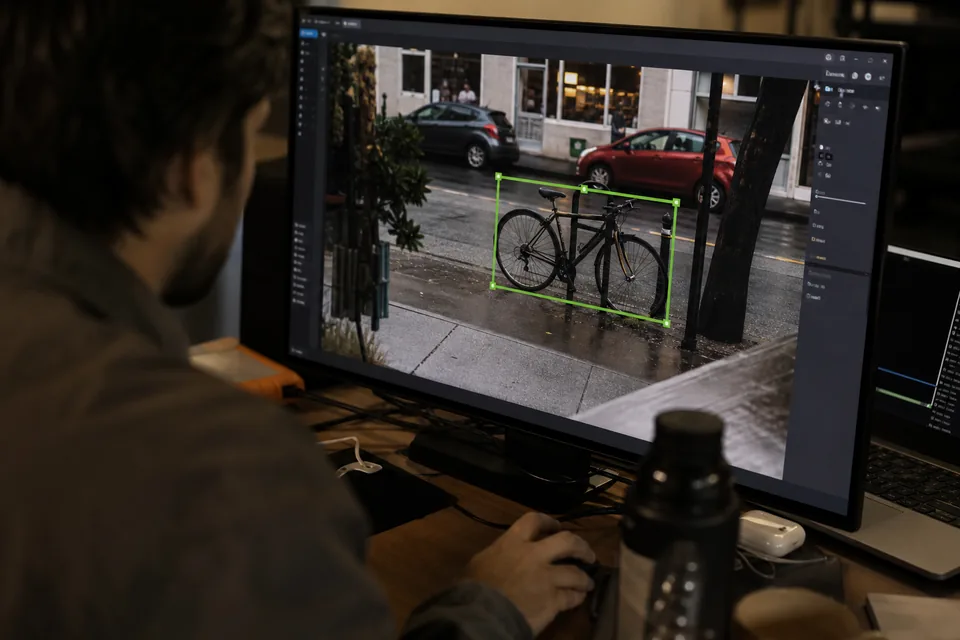
The best image annotation tool for YOLO is the one that hands your trainer a folder it reads without edits: one txt file per image with normalized boxes, a data.yaml with classes in a fixed order, and train, val and test splits that never shift between runs. For a team labeling every month, that means AI pre-labels, a review step and frozen dataset versions. ImageLabeling, Roboflow, CVAT, Label Studio and Ultralytics Platform all export YOLO, but they differ a lot on review, pricing and what else they try to do.
If you already know you want a hosted tool with flat pricing, the YOLO labeling tool page shows the exact export layout, and you can label one of your own images in the demo first.
YOLO annotation tools compared side by side
Prices and features were checked on each vendor's site in October 2026. Vendors change plans often, so confirm before you buy.
| Tool | YOLO export | AI pre-labels | Review step | How you pay | Best for |
|---|---|---|---|---|---|
| ImageLabeling | YOLO txt with data.yaml and fixed train, val and test splits, plus COCO, Pascal VOC and CSV | On every plan, with confidence per object | Single reviewer on Starter, consensus from Team | Flat plans from 49 USD a month or 24 USD a month billed yearly | Teams of 3 to 30 that train in their own code |
| Roboflow | Many YOLO versions, including segmentation | Label Assist, Smart Polygon and Auto Label | Review Mode on Enterprise | Credits, Core from 39 USD a month | Teams that also want hosted training and deployment |
| CVAT | Ultralytics YOLO formats for detection, segmentation and pose | Built in models and your own model through a serverless function | Validation and review jobs | Self hosted, or CVAT Online Solo 33 USD a month and Team 33 USD per user a month | Engineers who can run and maintain their own server |
| Label Studio | YOLO export for rectangle labels | Through an ML backend you connect and run | Reviewer role in the paid editions | Self hosted community edition, paid hosted editions by quote | Teams that label images and text in one tool |
| Ultralytics Platform | Native YOLO datasets | Model assisted labeling inside the platform | Basic | Plans on the Ultralytics site | Solo users who want label, train and deploy for YOLO in one place |
| LabelImg | YOLO txt for boxes | None | None | Desktop app, archived project | One person labeling a small set offline |
What makes an annotation tool good for YOLO
YOLO looks simple. Each image gets a txt file, and each line holds a class index and four numbers between 0 and 1 for the box center, width and height. The problems show up later, when a dataset grows past a few thousand images and several people touch it.
- Stable class indexes. Index 2 has to mean forklift in every export of the same dataset. Tools that build the class list from whatever labels exist at export time can silently reorder it when a class is missing from one batch.
- Fixed splits. If the tool reshuffles train and val on each export, your validation numbers stop being comparable between runs. Splits should belong to a frozen dataset version.
- Empty files for background images. Negative examples need an empty txt file, not a missing one, or you lose control over how many backgrounds your model sees.
- AI pre-labels you can trust. Drawing every box by hand costs roughly 5 to 15 seconds per object. Correcting a good pre-label takes a click. Confidence scores tell reviewers where to look.
- A review step. One tired labeler with loose boxes can cost you several points of mAP. A second pair of eyes on each image is cheaper than another training run.
Our coco vs yolo format guide explains when YOLO txt is the right export and when COCO JSON serves you better.
ImageLabeling for teams that train in their own code
ImageLabeling is a hosted image annotation tool and nothing else. You upload images, the AI proposes boxes for your classes with a confidence per object, labelers accept or fix them with keyboard shortcuts, and reviewers approve or send images back. When the set is ready you freeze a version with split ratios such as 80, 10 and 10, and every export of that version gives you the same YOLO folder: images and labels per split plus data.yaml with names in schema order.
YOLO txt in ImageLabeling holds boxes. If you need YOLO segmentation polygons, export the same version as COCO JSON and convert it, or pick a tool from this list that writes YOLO segmentation directly. Pricing is flat: Starter at 49 USD a month includes 1,000 AI pre-labeled images, Team at 149 USD adds consensus review and 3,500 AI images. Details are on the pricing page.
Roboflow for an all in one YOLO pipeline
Roboflow covers labeling, dataset versions, augmentation, training and hosted inference, and it exports almost every YOLO variant, including segmentation. If you want to go from raw photos to a deployed model without running GPUs, it is the most complete option here.
The trade off is credits. Auto labeling, training and storage all draw from the same pool, and a review workflow with labeling analytics sits on the Enterprise plan. Teams that only use Roboflow for labeling often pay for parts they never touch. We compared both on the Roboflow alternative page.
CVAT for self hosted YOLO labeling
CVAT is the long standing open source annotation tool, now also sold as CVAT Online. It exports the Ultralytics YOLO formats for detection, segmentation and pose, supports interpolation for video frames and lets you plug in your own detector for pre-labels. CVAT Online costs 33 USD a month for Solo and 33 USD per user a month for Team, or about 30 percent less billed yearly.
Self hosting is where the real cost hides. Someone on your team has to run the server, the database, upgrades, backups and the serverless functions for AI models. For a research group with a spare engineer that is fine. For a product team on a deadline it is often the most expensive choice in practice.
Label Studio and Ultralytics Platform
Label Studio is a general labeling tool that handles images, text, audio and time series in one interface. Its YOLO export works for rectangle labels, and AI pre-labels need an ML backend that you host and connect yourself. It suits teams with mixed data types more than teams whose whole job is object detection.
Ultralytics Platform comes from the company behind the YOLO models. It ties dataset labeling to training and deployment of Ultralytics models, so a solo engineer can stay inside one product. Larger labeling teams usually miss deeper review and QA controls.
Are desktop tools like LabelImg still worth it?
For one person labeling a few hundred images offline, a desktop tool works. LabelImg writes YOLO txt files directly. The project has been archived, though, so it gets no fixes, has no AI pre-labels and no way for a second person to review. Once a dataset is shared by a team, retrained every month or tied to a delivery date, a hosted tool with review and versions pays for itself in the first rework you avoid.
Which YOLO annotation tool should you buy
- You train in your own code and label every month with a small team: ImageLabeling. Flat price, YOLO export with fixed splits, review from the Team plan.
- You want labeling, training and deployment in one account: Roboflow.
- You have an engineer who can run servers and want full control: self hosted CVAT.
- You label text and audio as well as images: Label Studio.
- You work alone on Ultralytics models end to end: Ultralytics Platform.
If your images come from drone flights, the stitching usually happens first in drone mapping software, and you label tiles cut from the orthomosaic. Large tiles with many small objects make AI pre-labels and a zoomable editor matter even more, which the auto labeling page covers in detail.
Do I need a paid annotation tool for YOLO?
Not for one person and a few hundred images, where self hosted CVAT or Label Studio work. Once a team labels every month, a paid hosted tool is usually cheaper overall, because self hosting costs engineering time and most open source setups lack AI pre-labels and review until you build them.
Does Roboflow export YOLO format?
Yes. Roboflow exports YOLO txt for many YOLO versions, including segmentation formats, together with a data.yaml file. Exports are part of every plan, while AI labeling, training and storage use credits. Review Mode and labeling analytics are on the Enterprise plan.
Can CVAT export YOLO?
Yes. CVAT exports Ultralytics YOLO formats for detection, segmentation and pose, and it can import them as well. You choose the format when you export a task or project. In the self hosted edition you are responsible for running the server and any AI models used for pre-labels.
What format does YOLO need for labels?
YOLO needs one txt file per image with the same base name. Each line holds a class index starting at 0 and the box center x, center y, width and height, all divided by the image size so they fall between 0 and 1. A data.yaml file lists the class names and the train and val folders.
How long does it take to label 1,000 images for YOLO?
By hand, with three to five objects per image, expect roughly 6 to 15 hours for one labeler. With AI pre-labels that are mostly right, the same set often takes 2 to 4 hours of correction plus review. The gap grows with object count per image, which is why pre-labels matter most on crowded scenes.